
Optiwise vs Excel: Run Production Beyond the Planning Sheet
Move manufacturing planning into Optiwise. Connect BOMs, stock, purchase orders, shop-floor work and AI actions in one operating workflow.
Turn your manufacturing plan into work your team can execute in Optiwise. Connect BOMs, stock, purchase orders, production jobs and quality records instead of maintaining the links in separate planning workbooks. Manufacturing ERP, shop-floor execution, industrial IoT, actionable AI and no-code customization work together in Optiwise.
Excel is useful for calculations, analysis and flexible planning models, including AI-assisted workbook work with Copilot. Optiwise is the operating system for the transactions behind the plan: material, orders, production and inspections.
Book an Optiwise demo · Explore Optiwise production
Optiwise and Microsoft Excel at a glance
| Your workflow | Optiwise | Microsoft Excel |
|---|---|---|
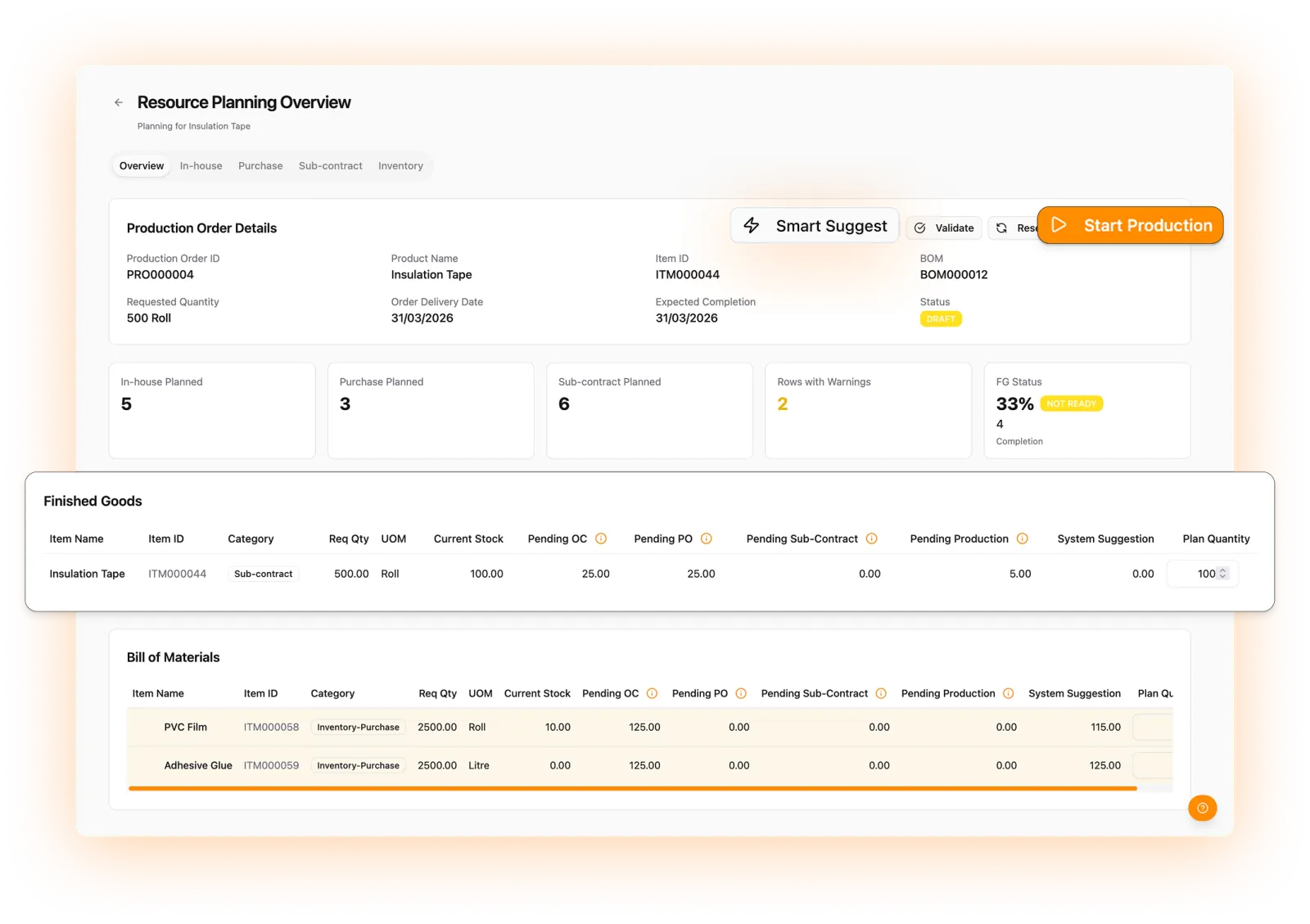
| Planning structure | Turn shortages into work. Smart Suggest nets BOM demand against stock, open purchase orders and existing production. Create the in-house jobs, purchase indents and subcontract orders your team needs from the resulting plan. | Workbook tables, formulas and models you structure. |
| Team work | Give sales, stores, purchasing, quality and production role-based records and approval queues. Keep departmental handoffs tied to the same customer order, with AI actions respecting each user’s permissions. | Shared workbook editing and coauthoring. |
| AI | Ask and act across production, purchasing, inventory, sales and tasks. Specialized multilingual agents retrieve connected records and execute actions within role permissions; machine intelligence adds anomaly and energy insights. | Copilot assistance and changes within the workbook. |
Product references: Microsoft Copilot in Excel. Updated 10 September 2026.
ERP + MES + industrial IoT + AI. One Optiwise platform.
AI that moves factory work forward
Ask about delayed orders, retrieve vendor history or create a stock entry in natural language. Optiwise routes the request to a specialized production, purchase, inventory, sales or task agent and executes within your role permissions. Your team can work in its own language.
Industrial IoT, from the device to the decision
Connect OptiEdge gateways, power monitors, machine-status signals and vibration sensors. Track OEE, runtime, downtime and energy. Our machine intelligence highlights abnormal signals, while the command center takes you from a multi-plant view to the machine that needs attention.
Your process, built into your ERP
Create relational modules, parent/child records, conditional forms, formulas and rollups without code. Add approvals, event-driven automations, webhooks and versioned SOPs so the system follows the way your factory operates.
Explore Optiwise AI agents · Explore industrial IoT · Explore no-code customization
Why choose Optiwise for your factory
Replace repeated planning updates with connected records
A confirmed sales order can create its work orders. Smart Suggest checks material demand against stock, pending POs and existing production. The planner creates the resulting jobs, indents and subcontract orders with the requirement attached, rather than copying action lists between departmental sheets.
Put execution beside the plan
Allocate machines and workers, attach drawings and capture process time and output. Follow material issues, inspections, rework and finished-goods receipt in the same workflow. Updates become operating records that purchasing, stores and sales can use.
Keep the flexibility your team needs
Import item and party masters from Excel, then add the fields and views your process needs in Optiwise. Build custom relational modules, formulas, rollups and event-based automations. Use AI agents to ask about business records and perform permitted actions without recreating the transaction in a spreadsheet.
See your factory workflow in Optiwise
Bring your product, process and team requirements. We’ll walk you through the connected order-to-production workflow and map it to your factory.
Book your Optiwise demo · Meet your AI agents · Explore no-code workflows
Questions about Microsoft Excel and Optiwise
Does Excel have AI features?
Yes. Microsoft Copilot supports AI-assisted work in Excel. Optiwise uses specialized AI agents within connected manufacturing workflows and business records.
Can we bring spreadsheet data into Optiwise?
Yes. Optiwise supports Excel imports for item and party masters. Clean and map the master fields, then manage the connected operating records in Optiwise.
Does Optiwise include industrial IoT and AI?
Yes. Optiwise combines manufacturing ERP and shop-floor execution with industrial IoT and specialized AI agents. Connect machines through gateways and sensors, track OEE, downtime and energy, and use natural-language queries and actions across production, purchasing, inventory, sales and tasks. No-code modules and automations let you extend the workflow.
Related Posts
A Manufacturing Alternative to SAP: Optiwise
Run your factory in Optiwise, a manufacturing alternative to SAP Business One with connected operations, AI agents and no-code workflows.
14 Jun 2026Read more →How Do I Know If My Manufacturing Business Really Needs an ERP?
A practical guide for manufacturers to identify when spreadsheets, manual follow-ups, and disconnected systems are no longer enough — and when ERP becomes an operational necessity.
14 Jun 2026Read more →Production Management System Optimized | Optiwise
Learn best practices for optimizing a production management system across planning, scheduling, material readiness, quality, and reporting.
12 Jun 2026Read more →
What Is the Best ERP for Pharmaceutical Manufacturing?
Learn how to choose the best ERP for pharmaceutical manufacturing, with guidance on batch control, quality workflows, traceability, inventory, documentation, and GMP discipline.
10 Jun 2026Read more →