
Optiwise vs OEMup: AI, IoT & Your Complete Factory Workflow
Compare Optiwise and OEMup for manufacturing ERP. See actionable AI, industrial IoT, vendor scoring, subcontracting and no-code customization.

Choose Optiwise for an AI-powered manufacturing system that reaches from customer orders to connected machines. Run production, purchasing, inventory, subcontracting and quality, with industrial IoT and no-code tools to shape the system around your factory.
A manufacturing system should follow the work from a confirmed order through every material and production step. Optiwise keeps in-house work, outside processing and buying decisions together.
Book an Optiwise demo · Explore Optiwise production
Optiwise and OEMup at a glance
| Your workflow | Optiwise | OEMup |
|---|---|---|
| Production | Run make-to-order and make-to-stock together. Generate work orders from confirmed sales, split or group work by product and coordinate production, purchase and subcontract actions from one action center. | Multi-level BOMs, manufacturing orders and MRP. |
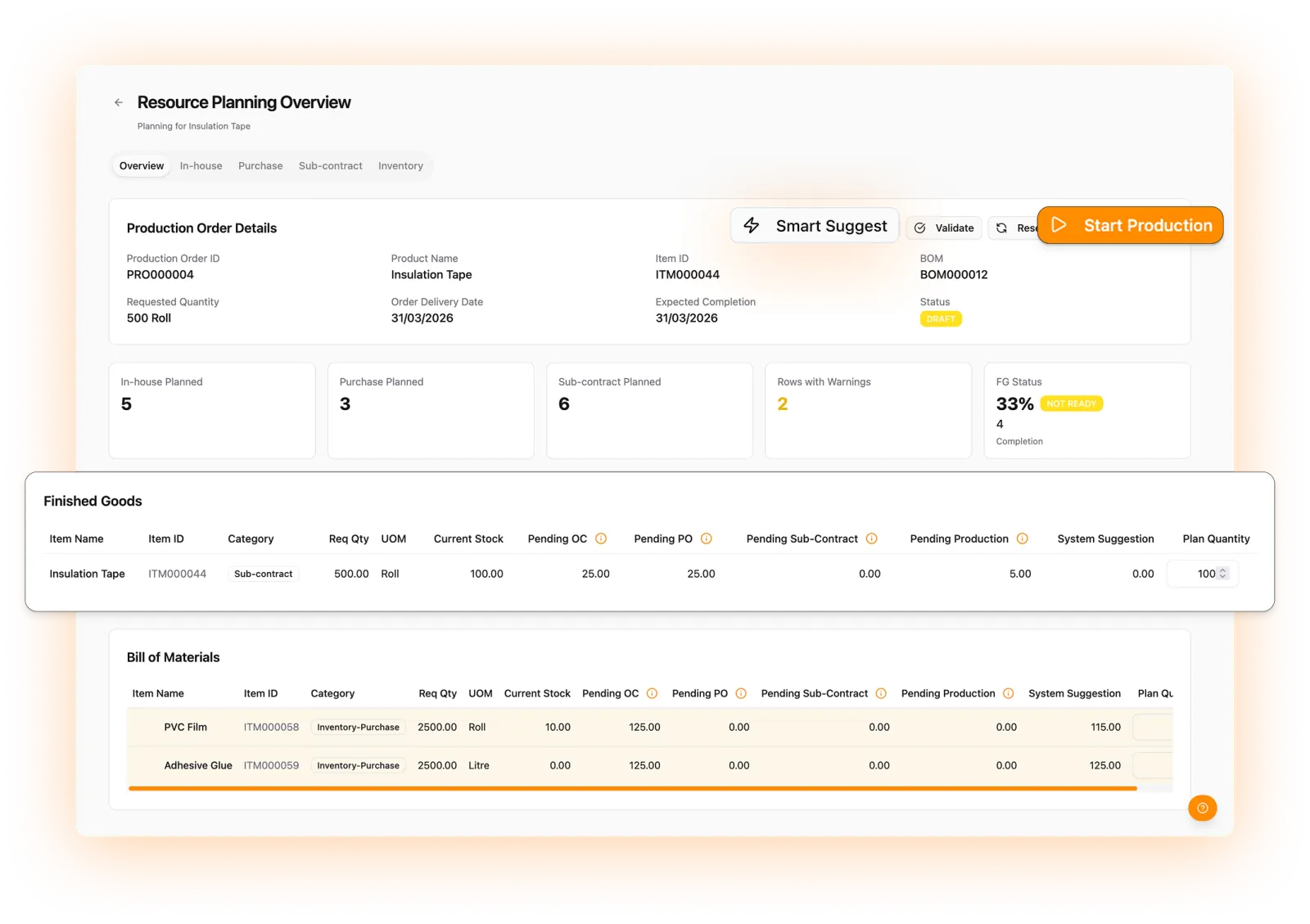
| Materials | Turn shortages into work. Smart Suggest nets BOM demand against stock, open purchase orders and existing production. Create the in-house jobs, purchase indents and subcontract orders your team needs from the resulting plan. | Material planning and stock reservation. |
| Purchasing | Source with production context: multi-vendor RFQs, a vendor portal, price/quality/delivery scoring, AI recommendations and rank-only bidding. Convert the selected quote to a PO and follow it through GRN and inspection. | RFQs, purchase orders and vendor workflows. |
| Receipt and inspection | Record partial or excess deliveries, route received items through QC and separate accepted from rejected quantities. Follow remaining PO quantities, returns and debit/credit notes through closure. | Partial receipts, inspection and lot traceability. |
| AI | Ask and act across production, purchasing, inventory, sales and tasks. Specialized multilingual agents retrieve connected records and execute actions within role permissions; machine intelligence adds anomaly and energy insights. | Natural-language ERP data queries through its AI assistant. |
Product references: OEMup features. Updated 10 September 2026.
ERP + MES + industrial IoT + AI. One Optiwise platform.
AI that moves factory work forward
Ask about delayed orders, retrieve vendor history or create a stock entry in natural language. Optiwise routes the request to a specialized production, purchase, inventory, sales or task agent and executes within your role permissions. Your team can work in its own language.
Industrial IoT, from the device to the decision
Connect OptiEdge gateways, power monitors, machine-status signals and vibration sensors. Track OEE, runtime, downtime and energy. Our machine intelligence highlights abnormal signals, while the command center takes you from a multi-plant view to the machine that needs attention.
Your process, built into your ERP
Create relational modules, parent/child records, conditional forms, formulas and rollups without code. Add approvals, event-driven automations, webhooks and versioned SOPs so the system follows the way your factory operates.
Explore Optiwise AI agents · Explore industrial IoT · Explore no-code customization
Why choose Optiwise for your factory
Keep every material decision tied to the order
Use the production action center to plan in-house work, purchase requirements and subcontract service orders. Smart Suggest accounts for available stock and work already ordered or in progress. Item classifications and BOM demand guide what happens next.
Control outside processing as closely as your own floor
Create service orders, issue BOM materials on delivery challans and track stock with each subcontractor. Record partial returns, inspect finished goods and keep rejected quantities and extra material issues visible. Production gets a complete view of the work still outside.
Make your process part of the software
Use our no-code builder for custom modules, linked records and department-specific views. Add conditional forms, approval rules, SOP acknowledgments and event-based automations. AI agents help users retrieve information and perform actions within their permissions.
See your factory workflow in Optiwise
Bring your product, process and team requirements. We’ll walk you through the connected order-to-production workflow and map it to your factory.
Book your Optiwise demo · Meet your AI agents · Explore no-code workflows
Questions about OEMup and Optiwise
Does Optiwise support manufacturing and AI together?
Yes. Production, purchasing, inventory and sales share connected records. Specialized AI agents answer operational questions and carry out permitted actions against that data.
Can Optiwise manage subcontracted production?
Yes. Manage service orders, delivery challans, vendor-held material, partial returns, inspections and rejected returns within the production workflow.
Does Optiwise include industrial IoT and AI?
Yes. Optiwise combines manufacturing ERP and shop-floor execution with industrial IoT and specialized AI agents. Connect machines through gateways and sensors, track OEE, downtime and energy, and use natural-language queries and actions across production, purchasing, inventory, sales and tasks. No-code modules and automations let you extend the workflow.
Related Posts

Plating Returns: Reconcile Each Lot Before Releasing Stock
Keep source lots intact through outside plating. Reconcile partial returns, quality holds and rework dispatches with a worked Optiwise material balance.
26 Oct 2026Read more →Cable Drum Inventory: Promise One Continuous Length
Track cable by drum before promising an unjointed length. Work through allocation, cut losses, usable remainders and the Optiwise stock handoff.
26 Oct 2026Read more →
Fabric Shade Groups: Allocate Rolls to a Cutting Lay
Allocate fabric rolls to cutting lays with shade-group approval, usable-length checks and remnant identity. Includes a two-group worked allocation example.
30 Sept 2026Read more →Powder Coating Reclaim: Keep Each Blend Traceable
Build a powder-coating reclaim record with parent lots, approved blend rules, mass reconciliation and job links. Includes a clearly illustrative balance example.
30 Sept 2026Read more →